

Even audio,
in one drop.
A free app that auto-levels the audio in your videos and recordings. Drop in a file, get a copy with smooth, consistent speech levels. The video itself is never re-encoded.
MaciPhoneiPadFree
Free on the App Store for Mac, iPhone and iPad · Direct Mac download: version 1.3.1 · 2.6 MB · macOS 27 or later
Features
Consistent levels without the pumping.
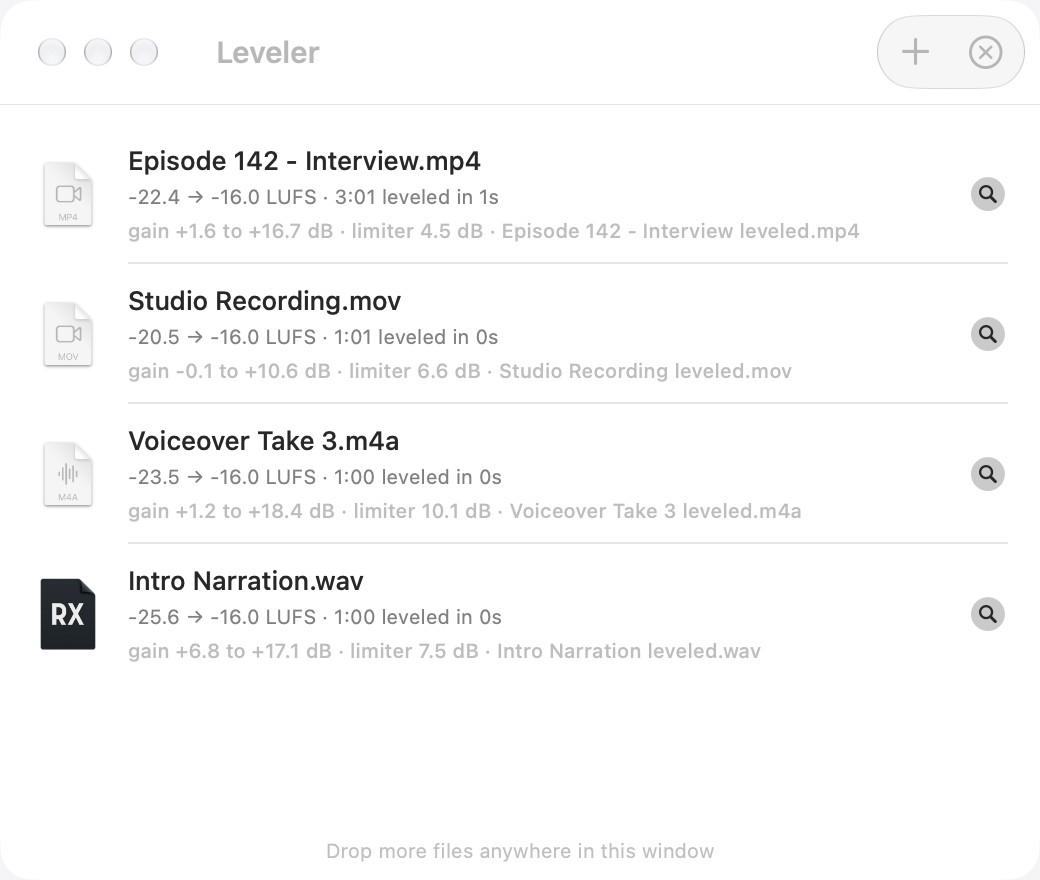
Leveler rides the gain the way a careful audio engineer would: slowly, with a look ahead, and only when someone is speaking. Quiet passages come up, loud ones come down, and pauses stay quiet.
Smooth leveling
A slow, look-ahead gain ride tracks the speaker's level over a few seconds instead of reacting to every syllable, so there is no breathing, no pumping and no squashed dynamics.
Pauses stay quiet
The leveler only listens to speech. Room tone, breaths and gaps between sentences don't get boosted, so background noise never swells up when you stop talking.
Video stays untouched
Only the audio track is replaced. The video stream is copied through byte for byte, so there is no re-encode, no quality loss and no waiting on an export.
Fast
A 90-minute recording levels in a few seconds. Drop several files at once and they queue up, or watch a folder and new files are leveled on arrival.
Loudness targets
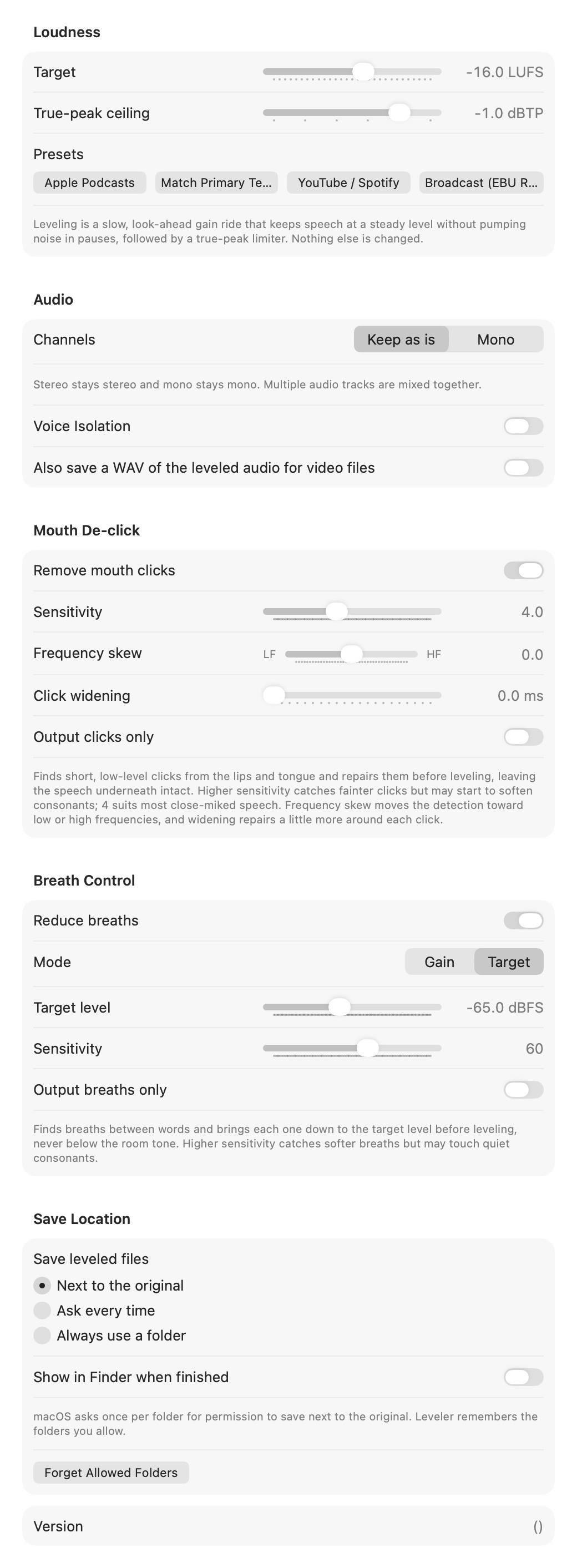
Lands on −16 LUFS with a −1 dBTP true-peak ceiling out of the box, the Apple Podcasts standard. Presets for YouTube, broadcast and more, or dial in your own.
Your file, plus one
Saves a new file next to the original with “leveled” added to the name. Optionally mix to mono, or also save a WAV of the leveled audio alongside the video.
Clean-up, if you want it
Optional steps around the leveler: Mouth De-click repairs lip smacks and saliva clicks without touching the words, Breath Control turns breaths down to a target level in the finished file or by a fixed amount, and Voice Isolation reduces room noise. Each can be auditioned on its own so you hear exactly what is removed.
How it works
Two passes, no guesswork.
Leveler reads the whole file before it changes anything, so it knows what is coming and never overshoots a loud moment.
- Analyze. The audio is measured in 10 ms slices. Slices that contain speech are tracked over a sliding few-second window to find how loud the speaker is at every moment.
- Plan the gain. A smooth gain curve brings every moment of speech to the target level, then the whole curve is calibrated so the finished file lands exactly on your loudness target.
- Render. The gain is applied, a true-peak limiter catches stray peaks, and the new audio is written into a copy of your file while the video is passed through untouched.
Install
Installing
Get Leveler from the App Store on Mac, iPhone and iPad, or download the Mac version directly. The direct download updates itself inside the app.
- Download Leveler on the App Store, or grab the disk image and drag Leveler into your Applications folder.
- Open the app. Both versions are signed by Apple, so macOS opens them without any security warnings.
- On the Mac, drop a video or audio file on the window or the Dock icon; the leveled copy appears next to the original. On iPhone and iPad, tap + to pick a file from Files or a video from Photos; the leveled copy lands in the Files app.
FAQ
Questions
Which files does it take?
MP4, M4V and MOV video, plus WAV, AIFF, M4A and MP3 audio. Video comes out in the same container with AAC audio. WAV and AIFF come out as 24-bit WAV, and other audio comes out as M4A.
Does it re-encode my video?
No. The video stream is copied exactly as it is. Only the audio track is replaced, and the two stay perfectly in sync.
How is this different from normalizing?
Normalizing applies one gain to the whole file, so a quiet guest stays quiet next to a loud host. Leveler follows the speech level through the recording and evens it out moment to moment, while leaving the natural dynamics inside each phrase alone.
What about files with several audio tracks?
They are mixed together, then leveled as one track. Turn on Mono in Settings if you want a single-channel result.
Where does the leveled file go?
Next to the original by default, with “leveled” added to the name. Settings lets you choose a folder for every export instead, or be asked each time. There is also an option to save a WAV of the leveled audio alongside a video.
Can it level files automatically?
Yes. In Settings › Watched Folders, pick one or more folders. Any new video or audio file that lands in them is leveled as soon as it has finished copying, with a notification when it is done. Files already in the folder are left alone and leveled copies are never picked up again. Turn on Open at Login so Leveler runs in the background without a window.
Does it change the sound in any other way?
Not unless you ask it to. The leveler itself is just the level ride and a true-peak limiter at the ceiling you choose: no EQ, no compression. Settings has three optional clean-up steps that run before it, all off by default: Mouth De-click, Breath Control and Voice Isolation.
Stop riding the fader by hand.
Free on Mac, iPhone and iPad.
Download on the App Store Direct download for Mac