

Names that say
what's inside.
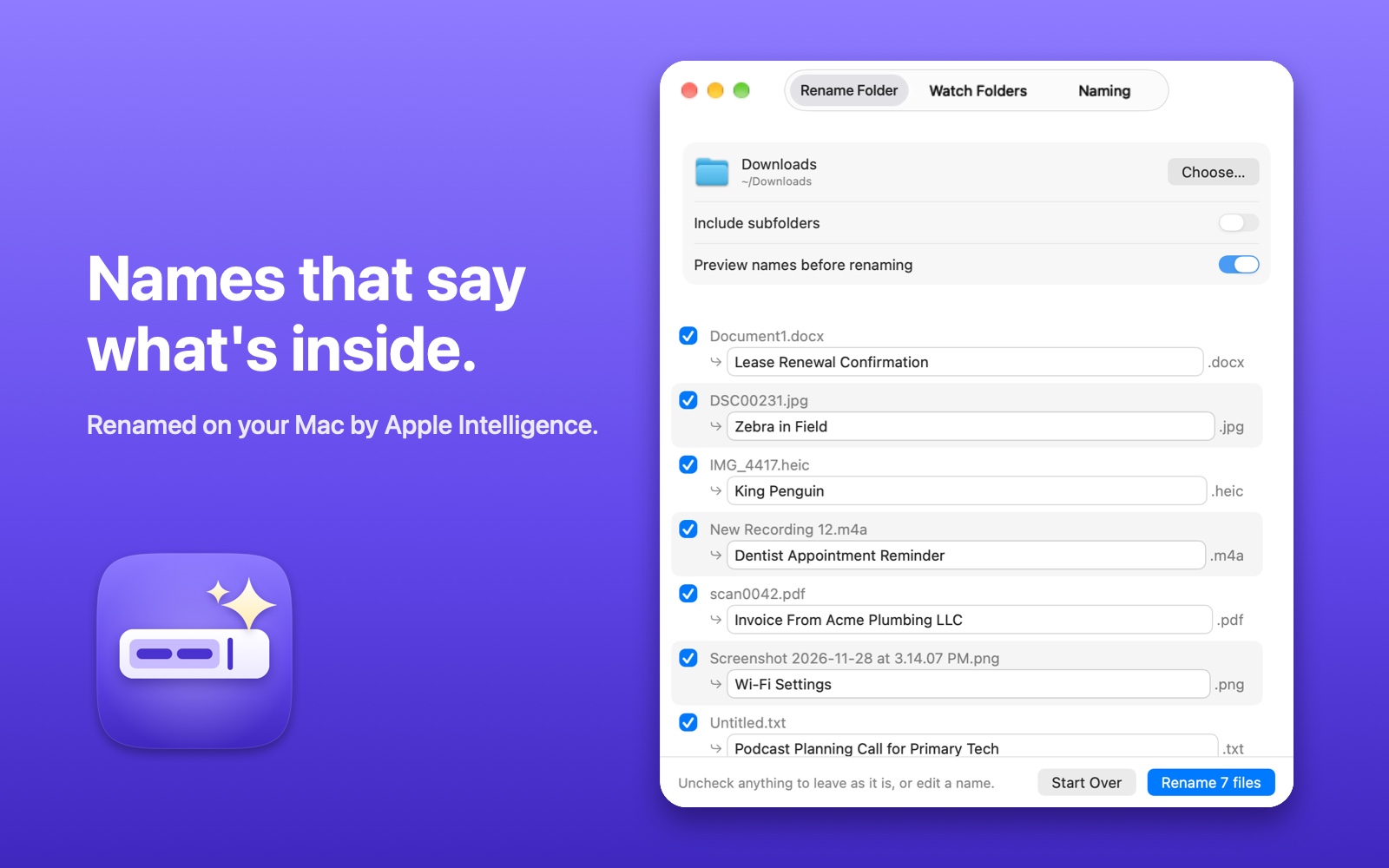
A free Mac app that renames files after what is in them, using the Apple Intelligence model built into your Mac. IMG_4417.heic becomes King Penguin.heic, scan0042.pdf becomes Invoice From Acme Plumbing LLC.pdf, and New Recording 12.m4a becomes Dentist Appointment Reminder.m4a. Everything happens on your Mac: no file, file name or content is sent anywhere.
MacFreeApple IntelligenceMenu barOpen source
Free · Version 1.0 · 2.7 MB · Requires macOS 26 or later, a Mac with Apple silicon, and Apple Intelligence turned on · Coming soon to the Mac App Store
Features
Files named for what they are.
Renamer reads each file and gives it a name that says what it is. It works two ways: rename a whole folder at once, or watch a folder and rename new files as they arrive. Either way, the file is read and named on your Mac.
Rename a whole folder
Choose a folder, or drop one on the window, and Renamer suggests a name for every file in it. Turn on Include subfolders to go into the folders inside it as well.
Preview, edit, undo
Look the names over before anything changes: uncheck a file to leave it as it is, edit any name, then rename. Afterwards, Undo puts every file back.
Watch folders
Add Downloads, your screenshots folder or any other, and new files are renamed as they arrive, once they have finished downloading or copying. Files that were already there are left alone, and so is anything you rename yourself.
Catches up when it opens
Files that arrive in a watched folder while Renamer isn't running are renamed the next time it opens. Turn on Open Renamer at login and it is always there.
Recent Activity
A list of what was renamed in your watched folders: what each file was called, what it is called now, and an Undo button for each one. A notification for each rename is optional.
Names the way you like them
Title Case, Sentence case, lowercase-with-hyphens or lowercase_with_underscores. Short, medium or long. Add the date at the start or the end, and give your own instructions, such as "Start invoices with the company name."
Careful by design
The file extension is never changed and nothing is ever overwritten: if a name is taken, the file becomes "Name 2". Apps, archives and source code are never renamed.
In the menu bar
Renamer lives in the menu bar and keeps working after you close its window. The menu shows the last few renames and the way back to the window. The Dock icon is optional.
Nothing leaves your Mac
Files are read and named on your Mac by Apple Intelligence. No account, no analytics, no tracking. The only network request is a check for new versions, made by the download from this page; the Mac App Store version will make none.
How it works
Read on your Mac, named in a few words.
Renamer reads what is in a file (the picture, the text, what is said in a recording) and asks the Apple Intelligence model on your Mac for a short name. The style, length and date you chose are then applied by Renamer itself, so the names come out consistent.
- Choose a folder. Click Choose Folder…, or drop a folder on the window or the Dock icon, then click Suggest Names. Renamer works through the files and fills in a name for each.
- Look the names over. Uncheck anything you'd rather leave as it is, or edit a name. Nothing has been renamed yet.
- Rename. Every checked file gets its new name. If you change your mind, Undo puts them all back.
- Or watch a folder. Add Downloads or your screenshots folder under Watch Folders and new files are renamed as they arrive, with each one listed under Recent Activity.
What it reads
It reads what's inside.
Each kind of file can be switched on or off in the Naming tab. Anything Renamer can't find a name in, such as a recording with nothing said in it, keeps the name it has.
Named from what they show, and any text in them.
Named from their text, or from the first page when it is a scan.
Text, Markdown, RTF, Word, Pages, Keynote, Numbers, Excel, PowerPoint, CSV and web pages.
Named from what is said in them, transcribed on your Mac.
Named from a frame of the video and what is said in it.
Apps, archives and source code are never renamed.
Install
Installing
Renamer is a free download, signed and notarized with Apple, and it updates itself: new versions arrive inside the app. It's also coming soon to the Mac App Store.
- Download the disk image and drag Renamer into your Applications folder.
- Open it. Renamer needs Apple Intelligence: if it is turned off, the window says so and has a button that opens System Settings.
- Choose a folder to rename, or add one under Watch Folders. Turn on Open Renamer at login if you'd like new files renamed without having to open it.
FAQ
Questions
Does anything leave my Mac?
No. Files are read and named on your Mac by Apple's on-device frameworks. No file, file name or content is sent anywhere.
What do I need to run it?
macOS 26 or later, a Mac with Apple silicon, and Apple Intelligence turned on. Without Apple Intelligence, Renamer can't name anything.
How good are the names?
They come from a small model that runs on your Mac, so most are right and some miss. That's why Preview names before renaming is on by default: check the list, fix or uncheck anything, then rename. Undo puts a whole run back.
Can it overwrite a file or change its type?
No. The file extension is never changed, and nothing is ever overwritten. If a file with the new name is already there, the renamed one becomes "Name 2".
Which files does it leave alone?
Apps, archives and source code are never renamed. A file is also left as it is when there is nothing to base a name on.
What happens to files already in a folder I start watching?
Nothing. Only files that arrive after you add the folder are renamed, and a file you rename yourself is left alone too. To rename what is already there, use Rename Folder.
What if Renamer isn't running when a file arrives?
It is renamed the next time Renamer opens. With Open Renamer at login on, that is the next time you log in.
Does it rename a file while it's still downloading?
No. A new file is renamed once it has finished downloading or copying.
Will it rename the same file twice?
No. Renamer marks each file it has renamed so it can skip it later. You can switch that off in the Naming tab.
Can I undo a rename?
Yes. After renaming a folder, Undo puts every file back. In a watched folder, each rename under Recent Activity has its own Undo button.
Can I tell it how to name things?
Yes. Choose the style, the length and whether to add the date, and write your own instructions, such as "Start invoices with the company name." They are passed to the model along with every file.
How do updates work?
The download from this page checks beardfm.app for new versions and offers them inside the app. Check for Updates… is in the Renamer menu and in the menu bar menu. The Mac App Store version, once it's out, will update through the App Store.
How will the Mac App Store version differ?
It is sandboxed, updates through the App Store, and makes no network requests at all. The download from this page is signed with Developer ID and notarized by Apple, is not sandboxed, and makes one kind of request: the check for new versions.
Is it open source?
Yes. The source is public under the MIT license on GitHub.
Does it collect anything?
No. There is no account, no analytics and no tracking in either version. See the privacy policy.
Names that say what's inside.
Free, open source, and notarized by Apple. Coming soon to the Mac App Store.
Download for Mac