

Play your
touchscreen Mac.
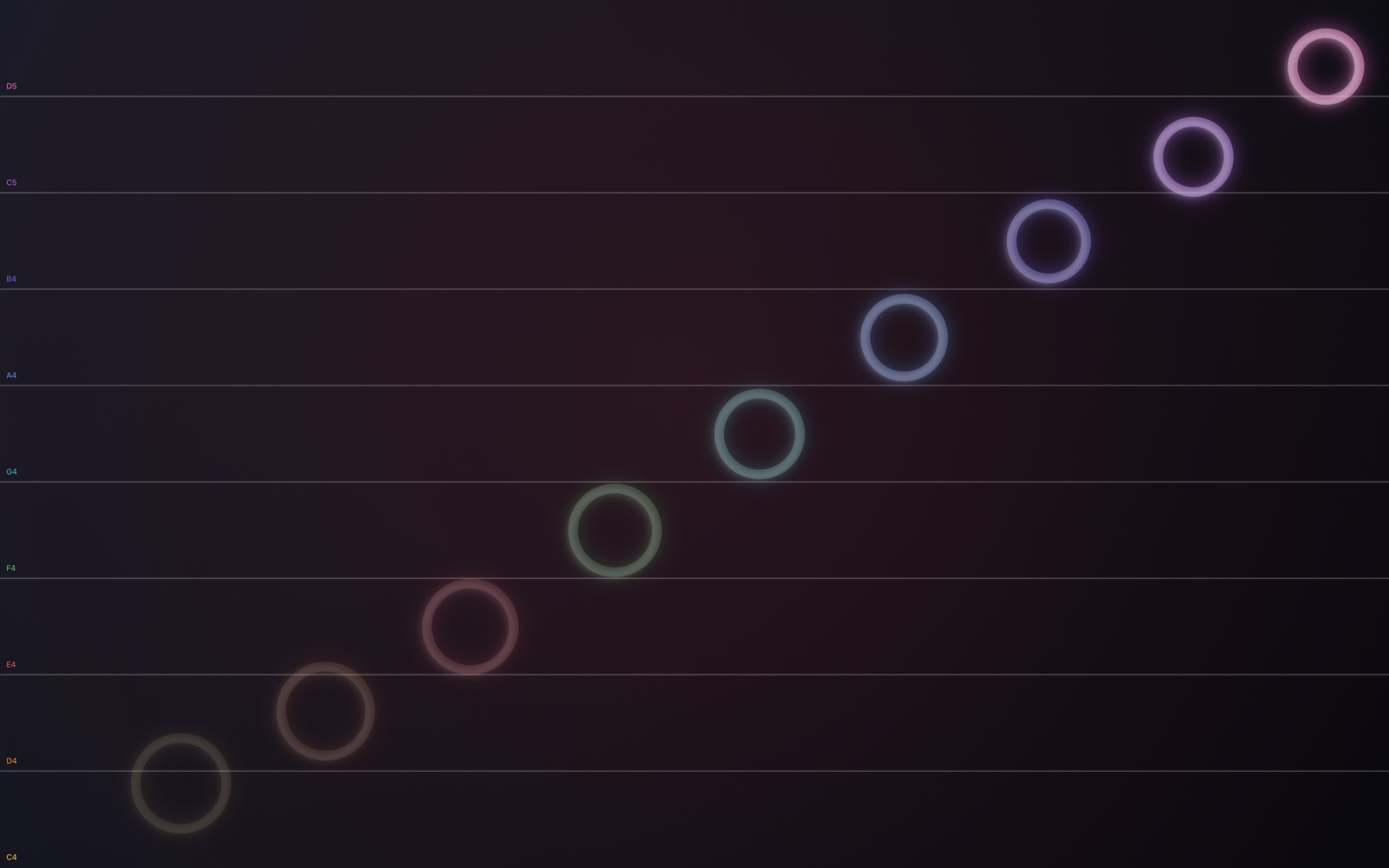
A free menu bar app that turns the display of the MacBook Pro with Touchscreen PROLED XDR Display into a piano. Turn it on and the whole screen becomes nine note zones in C major. Touch anywhere to play, use several fingers for a chord, slide for a glissando, and watch a glowing ring bloom from every touch.
MacFreeOpen source
Free · Version 1.1.0 · 1.6 MB · Requires macOS 27 or later
Features
The whole screen is the instrument.
Music Touch lives in the menu bar. Switch it on and a transparent layer covers the display, listening for touches. Switch it off and your Mac is back to normal. It's made for the touchscreen MacBook Pro, and it works with a mouse or trackpad on any Mac, too.
Nine zones, one scale
The screen is split into nine equal zones playing C4 D4 E4 F4 G4 A4 B4 C5 D5, from the bottom up. Or switch to horizontal, with low notes on the left and high notes on the right, the way a keyboard lies.
A ring for every touch
Each note has its own colour, from a warm yellow for middle C up through orange, coral, green, teal, blue, indigo and violet to pink. A thick, bright ring blooms slowly outward from exactly where your finger landed, then fades.
A soft piano
The grand piano built into macOS, mellowed with a low-pass filter and a long hall reverb, the kind of tone you'd hear under a quiet film scene. Notes sustain and fade on their own, and the note length is yours to set.
Chords and glissandos
Several fingers play several notes at once. Slide a finger across the zones and each new one plays as you cross into it, so a sweep up the screen is a run up the scale.
Lid logo pulse
On a MacBook Pro with the illuminated Apple logo, Music Touch can pulse the logo with every note: it rests dark while Music Touch is on, lights the instant you play and goes dark again as the note starts to fade. It uses the only control macOS offers, a system preference that needs an administrator password once, through a tiny helper you can install and remove from Settings.
Menu bar and a shortcut
No Dock icon, no window to manage. Click the piano keys in the menu bar, or press ⌃⌥⌘M from any app, to turn Music Touch on or off. Optional note lines with the note names help you learn where everything is.
How it works
On, play, off.
While Music Touch is on, a see-through layer sits above every window and the Dock, just under the menu bar, so a touch plays a note instead of landing in whatever is underneath. Nothing is recorded and nothing leaves your Mac.
- Turn it on. Click the piano keys in the menu bar and choose Music Touch On, or press ⌃⌥⌘M.
- Play. Touch anywhere. Low notes at the bottom, high notes at the top. Tap with several fingers for a chord, or sweep for a glissando. Each touch sends out a ring in its note's colour.
- Turn it off. Same shortcut or menu item, and your Mac is a Mac again. Music Touch stays in the menu bar, ready for next time.
Install
Installing
Music Touch is a free download, signed and notarized with Apple, and it updates itself: new versions arrive inside the app. It's also on the Mac App Store, where the sandboxed version has everything except the lid-logo helper.
- Download the disk image and drag Music Touch into your Applications folder.
- Open it. The piano keys appear in the menu bar; there is no Dock icon. Turn on Launch at Login in Settings if you'd like it always ready.
- Choose Music Touch On and touch the screen. For the lid logo pulse, open Settings › Apple Logo and click Install Helper.
FAQ
Questions
Which Macs does it work on?
It's built for the MacBook Pro with Touchscreen PROLED XDR Display, where every finger on the screen is a note. On any other Mac running macOS 26 or later it works with a mouse or trackpad: click to play, drag for a glissando. External touch displays aren't supported.
Can I use my Mac while it's on?
Not by touch. While Music Touch is on, the whole screen is the instrument and taps don't reach the windows underneath; the menu bar still works. Turn it off with ⌃⌥⌘M or from the menu bar and everything is back to normal.
What notes does it play?
Out of the box, the C major scale from middle C up to the D above the octave: C4 D4 E4 F4 G4 A4 B4 C5 D5, one per zone. Settings › Key changes the root, major or minor, and the number of zones. With the optional note lines on, each zone shows its name.
How does the Apple logo pulse work?
macOS lets the lid logo be switched off and on through one system preference that needs an administrator password. Install Helper in Settings installs a tiny launch daemon that flips that preference when Music Touch asks, so the logo can rest dark while Music Touch is on and light for each note. The logo cannot be dimmed, so it switches rather than fades. Uninstall Helper removes it and leaves the logo lit. The Mac App Store version can't install the helper because of the App Sandbox, so get the download from this page if you want it.
Can I change the key or the number of notes?
Yes. Settings › Key picks any root from C to B, major or natural minor, and 8 to 12 zones. The screen divides evenly, the note lines are labelled for the key, and the colours spread across the same warm-to-cool run.
Which audio output does it use?
Whatever your Mac is set to: the piano plays through the current default output in Sound settings and follows it when you switch to headphones, AirPods or a display. Settings › Status shows the output in use and whether the last note came from a touch or a click.
How do updates work?
The download from this page checks beardfm.app for new versions and offers them inside the app. Check for Updates… is in the menu bar menu, and automatic checks can be turned off in Settings. The Mac App Store version updates through the App Store.
Can I change the sound?
You can set how long notes sustain and fade, from half a second to eight seconds, in Settings. The piano itself is the one built into macOS, warmed up with a filter and reverb. Different instruments are a reasonable thing to ask for; the project is open source.
Does it collect anything?
No. There is no account, no analytics and no network access of any kind.
Is it open source?
Yes. The whole app is MIT-licensed on GitHub, including the script that draws the icon. Issues and pull requests are welcome.